
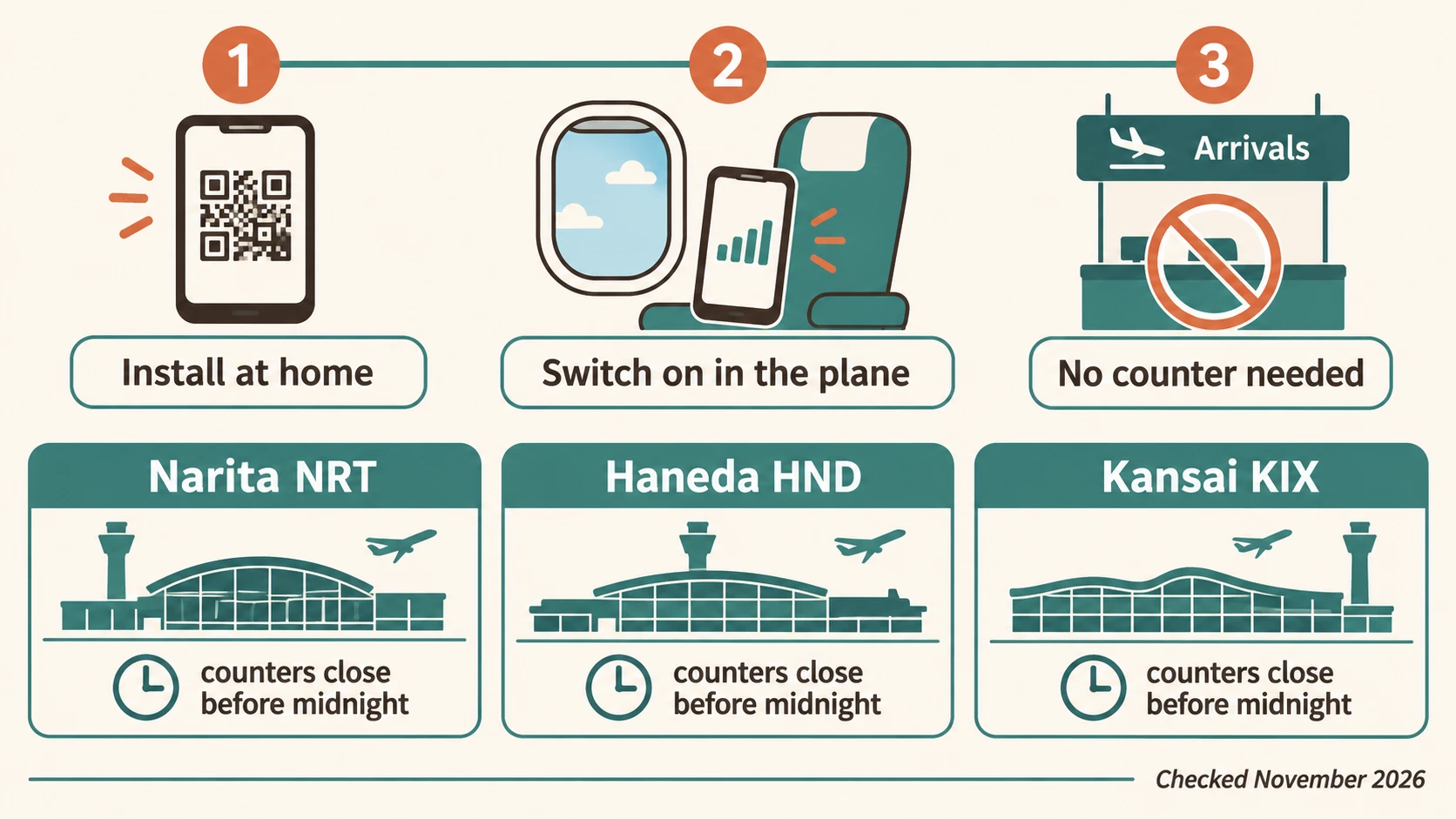
The best eSIM for Japan for most visitors is a data-only plan of 10 to 20 GB valid 30 days, installed at home and switched on while the plane taxis to the gate. Airalo sells 10 GB for $17.00 and 20 GB for $23.50, Ubigi sells 10 GB for $16, and Saily sits in the same range. You do not need a Japanese phone number for maps, trains, Suica or hotels, and you do not need the airport counter unless you want a physical SIM with a number or a pocket WiFi for a group. We checked prices, daily caps and counter hours in November 2026 and built this guide around the first hour after landing at Narita, Haneda or Kansai, because that is where the other guides stop. It is the connectivity chapter of our Shimokitazawa guide, written for the trip that ends in Tokyo’s back streets.
What should you buy before landing in Japan?
Buy a data-only eSIM for the whole trip before you fly. One traveler needs 10 GB, a couple needs one plan each, and a family of four should read the pocket WiFi math below before buying four of anything.
Think of the airport counter the way you think of the hotel umbrella stand. It exists, it helps in a pinch, and nobody plans a trip around it. An eSIM bought a few days early does its only hard step, the install, on your home Wi-Fi. After landing you flip one switch. The counter is for people who need a physical SIM with a Japanese number, and for groups picking up a rented router.
If you travel alone or as a couple on a 10 to 14 day trip through Tokyo, Kyoto and Osaka, 10 GB per person covers Google Maps every day, Navitime for the trains, a camera translator in restaurants and a few video calls home from the hotel. Heavy users who upload video or tether a laptop should look at 20 GB or at an unlimited plan with a daily cap they can live with. Families and groups of three or more should compare one pocket WiFi against several eSIMs; the answer is not obvious and we run the numbers in a moment.
Some links on this page are partner links. If you buy through them, The Shimokitazawa earns a small commission at no extra cost to you. Prices were checked in November 2026 and can change; the plan page always shows the current one.
Japan eSIM compared by network: Docomo, au and SoftBank
Every Japan eSIM rents capacity from one of three carriers. The carrier decides how your phone behaves on a mountain pass or in a subway tunnel, so compare the network first and the brand second.
NTT Docomo and au by KDDI generally have the widest rural reach, which matters on day trips to Hakone, Nikko or the Japanese Alps. SoftBank is strong in the cities and thinner in the countryside. All three cover the Shinkansen and the Tokyo and Osaka subways. The table shows who runs on what, as far as each seller discloses it, plus the price of a 10 GB plan for 30 days and what “unlimited” means in practice.
| eSIM | Japanese network | 10 GB, 30 days | Unlimited and its daily cap | 5G | Japanese number | Hotspot | Where to buy |
|---|---|---|---|---|---|---|---|
 Airalo (Moshi Moshi plan) | KDDI named on the plan page; 4G only | $17.00 (20 GB $23.50) | Unlimited 10 days $32, 30 days $64; fair-use rules on the plan page | No, LTE | No; separate call and text plan exists | Yes | Check Airalo price → |
 Saily | Not disclosed before purchase | Mid-range; fixed 7 and 30 day plans from 1 GB | Unlimited 1 to 30 days, full speed for the first 5 GB each day, then 1 Mbps | Not promised | No | Yes | Check Saily price → |
 Yesim | Not disclosed before purchase | Larger plans and unlimited only, no 1 GB tier | Unlimited plans with tethering; threshold not published | Yes on unlimited plans | No | Yes | Check Yesim price → |
 Ubigi | Docomo and au | US$16 (25 GB US$29) | Unlimited 15 days US$49 | Yes | No | Yes, top-ups available | Ubigi app, no partner link on this page |
 Holafly | KDDI and SoftBank | No GB tiers, unlimited only | Unlimited with a limited hotspot allowance | Not promised | No | Limited | Holafly site, no partner link on this page |
 Mobal or Sakura Mobile (local) | Japanese carriers, voice and data | Voice plans priced higher than data-only | Unlimited 5G plans at Mobal | Yes | Yes | Yes | Their own sites or airport counters |
Two things in that table matter more than the dollar column. The first is the daily cap behind the word unlimited. The second is whether the seller tells you the network before you pay. Ubigi and Holafly do. Saily and Yesim show it only after the profile is installed. Airalo names KDDI on the Japan page, which is good news for day trips, with the trade-off that its Japan plans run on LTE rather than 5G. For maps and messaging you will not feel the difference. For uploading a day of 4K video from a ryokan, you might.
Narita, Haneda or Kansai: where do you get online in the first hour?
With an eSIM installed at home you are online before the seatbelt sign goes off, at any of the three airports. The counters below are for physical SIMs, pocket WiFi pickups and emergencies, and most of them close before midnight.
Here is what each arrival looks like in practice. Hours come from the providers’ own pickup pages as of November 2026 and vary by counter, so treat them as a guide rather than a timetable. If your flight lands after 23:00, assume the counters are closed and plan on the eSIM.
Narita (NRT): two terminals, counters in both arrivals halls
Narita is the long ride into Tokyo, so sort your connection before the train, not after. In Terminal 1 the JAL ABC counter sits on the 1st floor at the end of the South Wing, open from 06:30 until the last arrival, and the SoftBank shop in the same terminal runs from 04:30 to 23:00. In Terminal 2 the JAL ABC counter is on the 1st floor of the main building from 06:30 until about an hour after the last flight, and Bic Camera on the 4th floor sells SIMs from 07:30 to 21:00. Both terminals have vending machines with prepaid SIMs for the hours when staff have gone home. From Narita, a Skyliner or Narita Express ride to Shinjuku or Shibuya takes roughly an hour, and that hour is when a working map app earns its keep. Our page on how to get from Narita or Haneda to Shimokitazawa covers the last train hop.
Haneda (HND): Terminal 3, one arrivals lobby, late closing
Haneda is the easy airport. International flights use Terminal 3, and the rental counters sit on the 2nd floor arrivals lobby near the Keikyu ticket gates. The Global WiFi and Ninja WiFi counter is listed from 06:30 to 23:45, Japan Wireless from 06:30 to 23:00, and both accept last-minute orders if stock allows. Prepaid SIM shelves exist but thin out late. Haneda sits about 30 minutes from Shinjuku by Keikyu and Yamanote, close enough that many people simply switch on the eSIM at the gate, tap a Suica on the phone and go. If you are flying in on a red-eye that lands after midnight, the free airport Wi-Fi reaches the train platforms, but the counters do not.
Kansai (KIX): Terminal 1 only, Terminal 2 has no counters
Kansai serves Osaka and Kyoto and spreads its counters along the 1st floor international arrivals lobby of Terminal 1. Sakura Mobile and Ninja WiFi list 06:00 to 23:00, the JAL ABC counter 06:15 to 22:30, and the Trazy eSIM desk only 09:30 to 18:30. Terminal 2, used by Peach and some other low-cost carriers, has no SIM or WiFi counters at all; you take the free shuttle to Terminal 1. Kansai is also where the IC card changes name. The local card is ICOCA, it works in Tokyo just as Suica works in Osaka, and a Suica on an iPhone covers both.
Do you need a Japanese phone number in Japan?
No for maps, trains, Suica, hotels, messaging and almost every app. Yes for a short list, which comes down to some restaurant bookings, a few delivery services and taxi apps that verify you by SMS.
Restaurants are the honest reason to want a local number. Many places still take bookings only by phone, and even on booking sites such as TableCheck a Japanese number makes staff less nervous about reaching you if you run late. Most English booking forms accept a foreign number with the country code, so try yours first and keep a hotel concierge as plan B for the one omakase counter that will not budge. Delivery apps such as Uber Eats talk to you inside the app, so no number is needed there.
Taxis are the second case, and it is a registration problem rather than a riding problem. The GO app, the most widely available taxi app in Japan, has accepted foreign numbers since November 2023 and takes international cards and Apple Pay. The catch is the SMS code at sign-up. A data-only eSIM cannot receive texts, so register with your home SIM active before you leave, or keep the home line switched on for SMS while the Japan eSIM carries data. GO also notes that some country numbers fail when registration is attempted outside Japan; its fix is to allow location access and retry once you have landed, and the app offers a passport-plus-selfie check if the text never arrives. Uber usually works in Tokyo and Osaka with your existing account and no new number at all.
If you decide you really want a Japanese number, the clean way is a voice-and-data eSIM or SIM from a local provider such as Mobal or Sakura Mobile, bought online before the trip. Airalo also lists a Japan plan with calls and texts. All three cost more than data-only, which is the price of being reachable by a sushi chef.
No Japanese number? Here is what still works. Google Maps and Navitime, including live train platforms. Suica or PASMO in Apple Wallet, from the first tap at the airport. Hotel check-in, since hotels ask for a passport, not a phone. Shinkansen tickets bought online and loaded to an IC card or shown as a QR code. Uber, with the account you already have. Convenience store ATMs and card payments. Without a number you lose three things. New GO taxi accounts until you pass the SMS or passport check, a few phone-only restaurants, and any Japanese service that insists on a 090 or 080 number for verification.
Can you use Suica or PASMO on your phone with a travel eSIM?
Yes on an iPhone 8 or newer, with any eSIM or none. Suica, PASMO and ICOCA live in Apple Wallet, not in the SIM, and the tap at the gate works offline. You only need data to add the card and to top it up.
Apple’s own support page keeps the requirements short. You need an iPhone 8 or later (iPhone 7 for Suica), the current iOS, and an Apple Account with two-factor authentication. The phone can be bought anywhere; the region lock applies only to the Apple Watch, which must be a Japan-bought Series 2 or later. You can create a brand-new card inside Wallet before you leave home and load it with a foreign Visa, Mastercard or Amex, though some overseas cards get declined and need a second try or a different card. JR East also runs the Welcome Suica Mobile app for short-term visitors, launched in March 2025 and updated in October 2025; it is iPhone-only for now, with support for overseas Samsung Galaxy phones announced for 2027. See Apple’s page on adding Suica, PASMO or ICOCA to Apple Wallet and JR East’s Welcome Suica information for the current rules.
Android visitors have a less elegant answer. Mobile Suica on Android requires a Japanese-market phone, so travelers with a US Pixel or Galaxy buy a physical card instead. The Welcome Suica is valid 28 days with no deposit and is sold at Narita and Haneda, and the standard Suica, PASMO and ICOCA cards are back on sale too. The card itself needs no phone and no data, which makes it the one piece of the trip that does not care which eSIM you chose.
eSIM or pocket WiFi for Japan: when does the router win?
A pocket WiFi wins when three or more people, or a laptop, share one connection all day. For one or two phones an eSIM is cheaper, lighter and cannot be left in a taxi.
Japan is the last big destination where pocket WiFi is still a mainstream choice, and the search numbers show it. Americans look up “pocket wifi Japan” about as often as “eSIM Japan”. The routers are good, the counters at all three airports usually hand them over in minutes, and one device can feed a whole family plus a laptop. The costs are the parts nobody mentions in the brochure. The battery lasts a working day and no longer, so someone carries a power bank. Everyone stays within a few meters of the router, which turns a teenager’s detour into a connectivity crisis. There is a deposit, a return envelope or counter, and a fee if the last day runs late. Here is when each option makes sense:
- A solo traveler or a couple with eSIM-capable phones takes one data-only eSIM each and no router.
- A family of three or more, or anyone working on a laptop in cafes and trains, does better with one pocket WiFi picked up at the airport, plus a small eSIM on one parent’s phone for the moment the group splits.
- A phone without eSIM support, or a work phone you cannot touch, gets a physical prepaid SIM from the airport counter or a router, whichever counter is open when you land.
Routers are booked ahead and collected at the counters listed above; marketplaces such as Klook bundle the airport pickup with the rental. Compare pocket WiFi rentals with airport pickup →
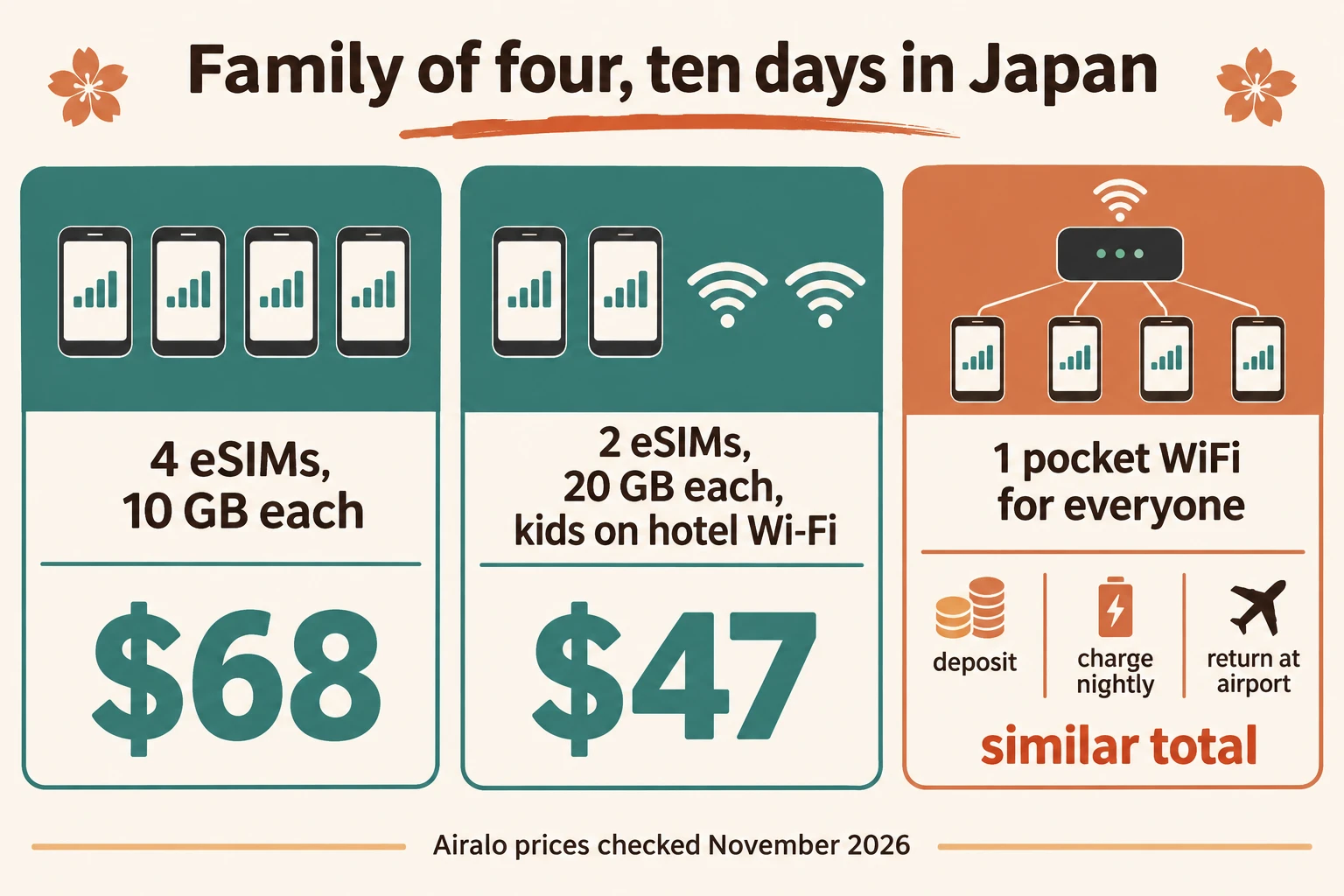
Pocket WiFi math for a family of four, ten days in Japan. Four Airalo 10 GB plans cost $68 and give each person 10 GB for 30 days, with no device to charge, return or lose. Two Airalo 20 GB plans for the parents and nothing for younger kids who ride on hotel Wi-Fi cost $47. A rented router for ten days usually lands in the same range once the deposit and pickup are counted, and it keeps everyone on one leash; its real advantage shows up only when a laptop joins the trip or when the group is five or more. Run the rental’s daily rate against $17 per phone and the decision is usually made in a minute.
How much data does a Japan trip actually use?
Most travelers seem to use 300 to 700 MB a day in Japan, so 10 GB usually covers two weeks of normal travel. Video uploads, tethering and streaming on the Shinkansen push that past 1 GB a day.
The rough numbers behind that figure are modest. Navigation in Google Maps burns around 5 to 10 MB an hour, Navitime less, a camera translator a few megabytes per menu, and a 30 minute video call home 150 to 400 MB. Photos synced to the cloud are the quiet budget killer, so set the backup to Wi-Fi only and let the hotel handle it overnight. A one-day walk through Shimokitazawa with maps open, a dozen translated menus and a vintage-shop price check or two uses well under half a gigabyte. Streaming is the exception. An hour of video is 1 to 3 GB, which is how a 10 GB plan dies on a single Tokyo to Kyoto train ride. Buy 20 GB if that sounds like you; the extra $6.50 at Airalo is cheaper than any top-up.
Unlimited eSIM for Japan: what the daily cap really means
Unlimited Japan eSIMs are unlimited in volume but not in speed. Each one slows down after a daily allowance, and the allowance is the number to compare, not the price.
Saily publishes the clearest rule. You get full speed for the first 5 GB each day and 1 Mbps after that, which is enough for maps and messages and not enough for video. Holafly sells unlimited only and limits hotspot sharing rather than the phone itself. Airalo’s unlimited Japan plans, $32 for 10 days and $64 for 30, point to fair-use terms on the plan page, so read them before you tether. Ubigi’s 15 day unlimited is US$49. Sim Local advertises no daily cap on the au network and is the plan heavy uploaders mention most. The trade-off is simple to state. A capped unlimited plan protects you from a bill shock you cannot have anyway on prepaid, while an uncapped one protects your evening upload. Choose by which of those two things you actually do.

Setting up your Japan eSIM: a 6-step checklist
Install at home on Wi-Fi, keep the line off until the plane lands, then switch on the Japan line and its data roaming while turning data roaming off on your home SIM. Done in the time it takes to reach passport control.
- Check that the phone is carrier-unlocked and supports eSIM. Settings shows “Add eSIM” on iPhone and “Download a SIM” on Android if it does.
- Buy the plan a few days early and keep the confirmation email; the QR code or the app does the install. Saily Japan plans →
- Install on home Wi-Fi, label the line “Japan” and leave it switched off. Validity on most plans starts at first connection in Japan, not at install, but check the plan page.
- Register anything that needs an SMS code, such as the GO taxi app, while your home SIM still has signal.
- After landing, turn the Japan line on, set it as the data line and enable data roaming for that line only. Travel eSIMs count as roaming by design, so this switch is normal.
- Leave the home SIM on for calls and SMS codes with its own data roaming off, so a bank verification text still reaches you without a roaming bill.
Will my US phone work in Japan?
Any iPhone from the XS onward and, as far as we can tell, most Pixel and Galaxy models of the last four years support eSIM and the Japanese LTE bands. The two things that stop people are a carrier lock and a corporate device policy, and both show up before you leave, not after you land. If your phone was bought on a payment plan, ask the carrier to confirm it is unlocked; a locked phone will install the eSIM and then refuse to connect. If eSIM is not an option at all, the physical SIM counters in the airports section are your route, and the data plans cost about the same.
Japan and Korea in one trip: one eSIM or two?
Two country plans are usually cheaper per gigabyte than one regional plan, and they do not share a cap. Take a regional plan only for a short hop where convenience beats price.
Airalo, Saily and Yesim all sell Asia-wide plans that cover Japan and South Korea on one profile, which saves one install and one switch. The cost is a higher price per gigabyte and, on some regional plans, a slower network pick in Korea than a local plan would give you. For a two-week Japan trip with four days in Seoul or Busan, buy a Japan plan here and a separate Korea plan, and check the Korean plan’s network and daily cap the same way you did here. For a weekend hop, a regional plan is fine.
FAQ: Japan eSIM questions we still get
Is the Abroad in Japan eSIM good? It is a branded resale of a standard Japan data plan, aimed at the YouTube channel’s audience. The data works like any other reseller’s; compare its price per gigabyte and the network it names against the table above before paying for the logo.
How do I check my eSIM data balance? In the seller’s app, which is why every provider above has one. iPhone also shows usage per line under Cellular, but it counts from the last reset, not from the plan start, so trust the app.
Does Japan have free Wi-Fi? Yes, in convenience stores, many stations, airports and most hotels and cafes. It is fine for a quick map check and useless for navigation in motion, which is the one thing you need data for.
Can I get an eSIM in Japan with calls and texts? Yes, from local providers such as Mobal and Sakura Mobile and through Airalo’s Japan voice plan. Expect to pay more than for data-only and to upload a passport scan at purchase, which is a legal requirement for voice numbers in Japan.
Which SIM providers are available in Japan? Three carriers run the networks, NTT Docomo, au by KDDI and SoftBank. Travel eSIMs from Airalo, Saily, Yesim, Ubigi and Holafly resell those networks for visitors, and local companies such as Mobal, Sakura Mobile and IIJmio sell prepaid SIMs with or without a number.
Pick the network you want behind the plan, buy it this week and install it on the sofa. That is the whole task, and it is the part most people leave for the arrivals hall at 23:30. Prices and counter hours on this page were checked in November 2026; the best eSIM for Japan next cherry blossom season may be a different plan from the same handful of sellers, so compare the daily cap and the network first, the dollars second.
From The Shimokitazawa desk. Our editorial standards